Edit Sites · PRO
your localhost, on the web.
Press Share in Edit and the web server on your computer gets an address on rustedit.site, like edit-sichy.rustedit.site. Open it on your phone, send it to a tester or point a webhook at it, while it still runs on your own machine.
Anyone you send it to
Browser
- A phone, a tester or a webhook
- Opens edit-sichy.rustedit.site
rustedit.dev
Relay
- Finds the site by its address
- Passes the bytes both ways
Your computer
Edit
- Serves localhost:5281
- Shares only the port you chose
§ 01 · What it is for
test it anywhere.
A dev server answers only on your own computer. Edit Sites gives it a real address for as long as you want one, without deploying anything.
-
On a real phone
Open what you are building on your own phone over mobile data, not only in a simulator or on the same Wi-Fi.
-
For testers and clients
Send the link and they see your work as it is now. When you save, they see the change on their next reload.
-
For webhooks
A public address takes calls that aren't a browser page straight through, so a webhook from a payment or a code host reaches your local server.
-
The same address
The address is your folder's name and your profile handle. Share the folder again and the same address comes back.
§ 02 · Sharing
one click in the Run bar.
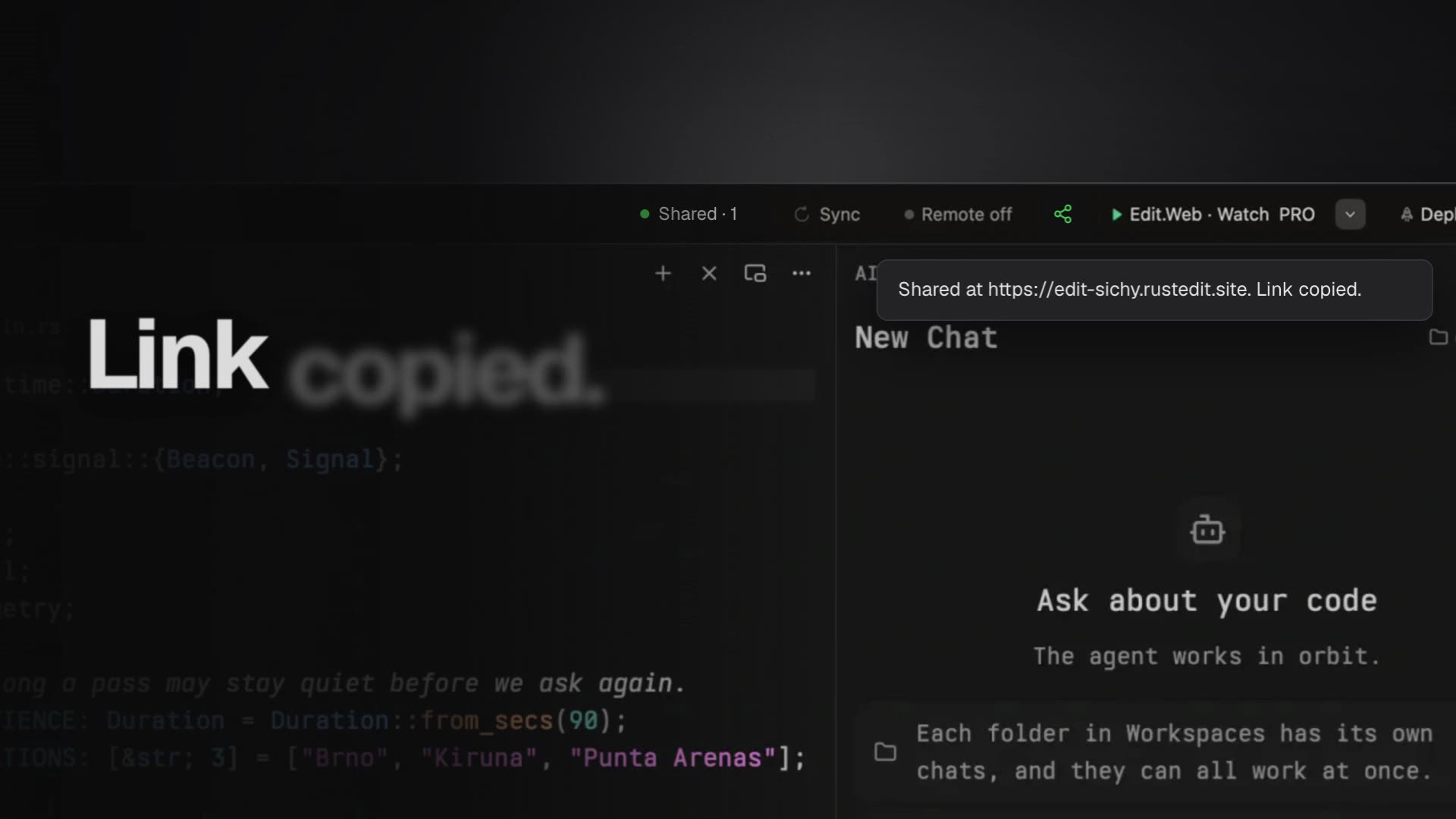
Press Play on a web project, then Share. Edit gives the server its address, copies the link and keeps the address up while Edit shares it.
-
Press Play
Run your web project as you always do. Edit sees the address it serves, like localhost:5281.
-
Choose Share
The Share button beside Play offers Share, for you only, and Share Publicly. Running servers in the Browser tab's list have a Share button too.
-
The link is copied
Edit shows the address and copies it. The title bar says Shared with a count, with a green dot while the relay is connected.
-
Change it any time
From the title bar, make a site public, list it on your profile or stop sharing it. Stop Sharing and Free the Address gives the name up.
§ 03 · How it works
your computer calls out.
Edit keeps one connection open to rustedit.dev. When someone opens your address, the relay asks Edit for one more connection, and the bytes run through it to the port you shared. Nothing connects to your computer from outside, so there is no port to open and no router to change.
- 01
GET /api/share/controlComputer: Edit opens a connection to the relay and proves it is your computer by signing a fresh random code with its own key.
- 02
{"serving": ["s_…"]}Computer: It says which sites it shares now. The relay keeps the ones that belong to your account, if the account has PRO.
- 03
{"dial": {"site", "stream"}}Relay: A visitor opens your address. The relay asks your computer for a connection for that site.
- 04
GET /api/share/streamComputer: Edit opens a new connection, signed with the same key, and the relay checks it against the request it made.
- 05
bytes ⇄ 127.0.0.1:5281Computer: Edit passes the bytes to the port in its own record, on your computer only. Either side closing closes both.
-
The relay speaks HTTP
rustedit.dev answers the visitor, keeps connections alive and handles WebSockets. Edit only moves bytes.
-
Edit stays small
On your computer, sharing is a list of sites with their ports and a pump of bytes to them.
-
Back after a drop
If the connection drops, Edit reconnects and tells the relay again what it shares.
§ 04 · Who can open it
only you, or anyone.
A share is private until you make it public. You choose for each site, and can change it while it is shared.
-
Only you
The address opens only in a browser signed in to rustedit.dev with your account. Anyone else sees that it is private, the same page whether the site exists or not. A visit lasts 12 hours.
-
Anyone with the link
Anyone can open it. A browser first sees a notice that says who shares the page and that it comes from their computer, then goes on with Continue. Webhooks and API calls skip it.
-
On your profile
A public site can be listed on your profile at rustedit.dev/u/your-handle, so testers find it there.
A page shared from someone's computer
sichy shares this page from their own computer with Edit.
It is served from that computer through rustedit.dev. Edit did not make it and does not check what it shows.
Don't enter a password you use anywhere else.
Continue Report this page
Shared with Edit
§ 05 · Security
a narrow door.
Sharing lets the internet reach a server on your computer, so the way in is narrow: one port you chose, only while Edit shares it, on a domain that can't touch your account.
-
Your computer only
Edit connects only to 127.0.0.1 or ::1, never to another machine on your network.
-
Only the port you shared
The relay names a site, never a port. Edit looks the port up in its own record, so the relay can't reach anything else.
-
Its own domain
Shared sites live on rustedit.site, not rustedit.dev, so a shared page never sees your rustedit.dev sign-in.
-
Signed by your computer
Every connection is signed with your computer's key, the one remote access uses, and the relay checks it.
-
PRO, checked again
The relay checks your account when you share, when Edit connects and once a minute. If PRO ends or you remove the site on the website, the address stops.
-
Nothing by itself
Edit shares nothing at launch on its own. Stop sharing or quit Edit, and the address says nothing is shared there.
Handles, to pass it on
- Which site the address names
- Each request and page, while it passes
- Its own access cookies, taken out before your server sees the request
Keeps
- Each site's name and address
- The port on your computer, and whether it is https
- Who may open it, and whether your profile lists it
- When it was made and changed
Never stores or logs
The pages your server sendsThe addresses visitors openHeaders and bodies of requestsA log of visits on rustedit.site
TLS ends at rustedit.dev: like any reverse proxy, the relay handles each page in the clear while it passes it on. It doesn't store or log it. Don't share a server whose pages must stay private between you and your visitor alone.
What the relay changes on the way
- Host
- becomes localhost and your port, so your server answers as it does on your computer.
- Origin and Referer
- from your shared address become your local address. Another site's Origin passes unchanged, so your server's cross-site checks still work.
- Forwarded headers
- X-Forwarded-*, X-Real-IP and Forwarded are dropped.
- Redirects
- to localhost on your port are moved to your shared address.
- Cookies
- lose any Domain, so they stay on your address. The relay's own two cookies never reach your server.
- Search engines
- every page goes out marked noindex, nofollow. Bodies are never changed.
§ 06 · Limits
the numbers in the code.
The limits as they are set today. They are starting values, and they will change once real pages have been measured through the tunnel.
Set in the code
- 20
- sites an account can have. ShareEndpoints.cs
- 5
- sites one computer serves at once. ShareHub.cs
- 16
- connections at once to one site. ShareHub.cs
- 120 s
- before an idle request or WebSocket closes. ShareProxy.cs, nginx
- 32 MB
- largest request body. nginx
- 120/s
- requests from one address to one site, in bursts of up to 600. Program.cs
- 12 h
- a private visit lasts before signing in again. ShareProxy.cs
- 7 days
- a public notice's Continue is remembered. ShareProxy.cs
§ 07 · Questions
fair questions.
What people ask before they share a server from their computer.
01Does my computer have to stay on?
Yes. Your computer serves the site, so it answers only while Edit runs and shares it. While it is offline or Edit is closed, the address says nothing is shared there; if your server stops, it says the computer did not answer.
02What does it cost?
Edit Sites is part of Edit PRO. Without PRO, Share explains that it needs PRO.
03Can I choose the address?
The address is the folder's name, a hyphen and your profile handle, on rustedit.site. Without a handle it ends in six random letters and digits instead.
04My front end calls an API on another port. Does that work?
Not by itself: a page that fetches http://localhost:5000 reaches the visitor's own computer. Proxy the API through your dev server, as Vite and Next can, so everything comes from the one port you share.
05Will signing in with Google or GitHub work?
Only if the provider accepts your rustedit.site address as a redirect. A provider that allows only localhost can't complete the sign-in.
06Will links to localhost inside my pages work?
Redirects to localhost are moved to your shared address, but links written into a page stay as they are. Use relative links.
07How do I stop?
Choose Stop Sharing for a site, or Stop Sharing All, in the title bar's menu, or quit Edit. Remove on your account's Shared sites page stops an address at once and frees it.